How to Migrate a Media Library Without Moving the Mess
A five-phase framework for auditing, cleansing, moving and maintaining valuable media assets
A media library migration may seem simple: choose a new system and move the files. But transferring years of video assets, versions, rights data and inconsistent metadata without reviewing them only gives the mess a new address.
Done well, a migration is an opportunity to remove costly clutter, recover valuable content and build a searchable library ready for automation and AI.
This article outlines five essential phases for getting it right.
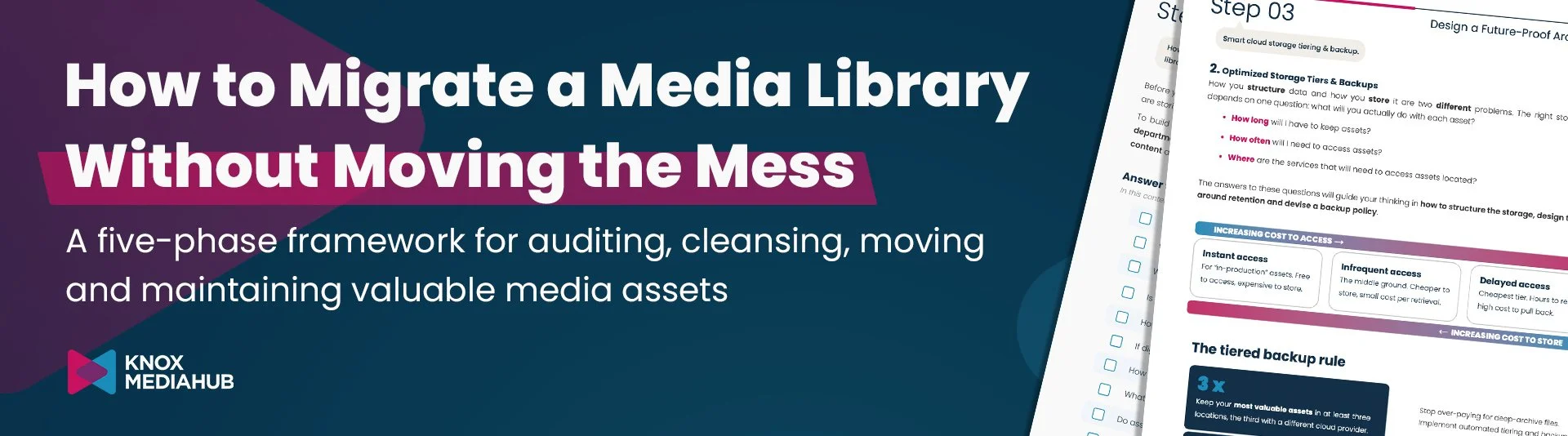
TL;DR: Do not begin a media library migration by moving files. Begin by understanding what you have, why it matters, who owns it, how it should be found and what it should cost to keep. Then migrate in verified waves and put governance in place so the new library stays useful.
Most media library migrations are described as moving content from A to B. That is technically true BUT strategically unhelpful.
A media library is not a pile of h264 files. It is a web of masters, versions, audio tracks, subtitles, artwork, QC documents, rights information, editorial metadata and relationships between them. But by only moving files without their context you miss an opportunity to find efficiencies and improve your media management operations.
Handled properly, migration is one of the few moments when a media business can examine its archive as a whole. It can recover valuable content, remove material with no remaining purpose, repair metadata, define better storage rules and build a library that supports automation and AI. Handled badly, it simply carries years of clutter into a more modern and possibly more expensive home.
What is a media library migration?
A media library migration is the controlled transfer of audiovisual assets and their associated metadata, relationships, permissions and operational rules from one storage environment or management system to another. It may involve moving from on-premises infrastructure to the cloud, replacing a legacy MAM, consolidating libraries after a merger or acquisition, or standardizing a fragmented estate spread across drives, tapes, buckets and third-party systems.
The word “controlled” matters. A successful migration preserves file integrity and business meaning. It should leave teams with a clearer catalog, a documented target structure, searchable metadata, appropriate storage policies and a reliable audit trail.
Why migration projects go wrong before the first file moves

The most common failure is treating migration as a transport project. Teams choose a tool, estimate the number of terabytes and start transferring. Only later do they discover that assets have no clear owner, identifiers do not match metadata, folder structures contradict the business, or duplicate versions have multiplied across locations.
The technology may be working perfectly while the outcome gets worse with every copied file.
The better question is not “How quickly can we move this library?” It is “What should the new library make possible?” That could mean faster content discovery, fewer storage surprises, better rights control, easier collaboration, a consolidated catalog after M&A, or a structure that allows automation to act on reliable metadata.
5️⃣ 📋
The five phases of a successful media library migration
1. Audit the catalog you actually have
Before renaming, deleting or moving a single terabyte, build a picture of your current media estate. Quantitative analysis tells you how much content exists, where it sits, which formats are involved and how much must be transferred. Qualitative analysis explains what the content means to the business.
Bring the relevant teams into the audit. Operations may know the delivery masters. Production may understand source projects. Legal may know which rights have expired. Marketing may depend on material that appears inactive in system logs. IT may understand the storage dependencies, but it should not be expected to determine editorial or commercial value alone.
🔍 At minimum, you should have a clear understanding of:
Asset location, size, format and technical condition.The department or business owner responsible for the content.Available identifiers and the relationship between filenames and metadata.Existing metadata sources, including databases, spreadsheets, XML files and sidecar documents.Current access patterns, downstream workflows and integrations.Rights, retention, compliance and security constraints.Known duplicates, orphaned files and assets that cannot be opened or understood.
2. Decide what earns a place in the new library
A migration creates a deadline for decisions that routine housekeeping can postpone indefinitely. Use it! Every unnecessary duplicate, expired version or files that can be easily recreated shouldn't be moved, as they waste time and storage space.
A practical keep, delete or review decision should consider at least these factors:
💡 Rule of thumb: If nobody can explain why an asset is being kept, that is not automatically permission to delete it. It is evidence that ownership and retention governance need attention.
Business value: Is the content currently licensed, monetizable, operationally important or strategically significant?
Rights and obligations: Does the organization still have the right to retain and use it? Is retention required?
Replaceability: Is the asset unique or expensive to recreate, or is it a derivative that can be regenerated cheaply?
📖 Need more guidance? Check the free Playbook for Designing, Migrating and Maintaining Media Libraries.
🗂️
3. Design the destination around use
Legacy folder trees often reflect old departments, systems or individual working habits. Reproducing them exactly may simplify the transfer while preserving the very constraints the migration was meant to remove.
Design the target library around how people and systems need to find, process and govern content. A useful architecture separates three related decisions:
Structure and identifiers: Define the minimum useful hierarchy and stable identifiers. A distributor might use Series > Season > Episode. A brand might use Brand > Campaign > Platform. Keep the number of layers low enough that users can understand them.
Metadata schema: Decide which catalog, asset, technical, rights and relationship data must be mandatory, optional, controlled or generated. (Check: 7 expert tips for effective Metadata Management in Media)
Storage and protection: Place assets according to access need, restoration time, value and retention policy. Frequently used proxies and in-production material need different storage types and access from deep archive masters.
✅ Choose a MAM that can manage lifecycle policies that move infrequently accessed archive material to colder tiers while keeping frequently used content immediately available.
💾 Backups need equal attention. The Knox Media Hub playbook recommends keeping the most valuable assets in at least three locations, with the third copy held by a different cloud provider; transient or lower-value assets may justify two copies. Metadata must also be backed up in a format the organization can actually read. A video file without its descriptive and relational context is protected but hard to find.
🔄
4. Migrate in controlled waves and verify every transfer
A migration plan should define what moves, in what order, through which method, with which acceptance tests and under whose authority. Start by testing the target system with representative dummy content. Then move a small, high-value set that exercises real metadata, permissions, relationships and workflows.
Why begin with valuable content? It is the material most worth protecting and the most likely to generate an early operational return. It also forces the migration team to prove that the hard parts work before volume hides the problems.
During transfer:
Keep the source assets in place until the target copy has passed acceptance checks.Validate file integrity with checksums or equivalent controls.Reconcile counts, sizes, identifiers, metadata fields and relationships.Test search, playback, access controls, workflow triggers and downstream integrations.Log exceptions and route them to owners instead of silently skipping them.
5. Make library maintenance business as usual
A migration is a moment. A tidy library is a habit.
Without operating rules, the new environment will gradually reproduce the same problems as the old one. Governance does not need to mean a permanent clean-up project. It means turning the right controls into routine operations and automation.
A sustainable maintenance plan should include:
Duplicate detection using file hashes and content-aware tools.Automated storage lifecycle policies, monitored against real access patterns and cost.Periodic review of metadata schemas, templates and mandatory fields.Reports by asset type, age, owner, usage, rights status and storage location.
This is where a well-managed library becomes business intelligence. Usage and cost data can support retention decisions. Rights and delivery history can improve auditability. Metadata can trigger workflows. A new series arriving in the library, for example, can become an event that starts a campaign or prepares a delivery package automatically.
A pre-migration checklist for media teams
Frequently asked questions about media library migration
💬 Should you ‘clean’ a media library before or after migration?
It’s best to clean before migration, but only once each asset value, rights and metadata are audited. This reduces transfer volume and prevents obvious clutter entering the new system. When time is limited, you can migrate questionable material into a controlled review area rather than mixing it with the trusted catalog.
💬 What should be migrated first?
After a representative test set, migrate high-value and frequently used assets first. They benefit sooner from the new environment and provide a rigorous test of metadata, security, search and workflow requirements.
💬 How do you preserve metadata during a MAM migration?
Export metadata from every relevant source, map legacy fields to the target schema, retain stable identifiers, document transformations and reconcile values after import. Preserve relationships between masters, versions, audio, subtitles, artwork, rights and supporting documents, not only flat descriptive fields.
💬 How long does a media library migration take?
There is no reliable duration based on terabytes alone. Timing depends on source locations, network or physical transfer methods, format diversity, metadata quality, required manual decisions, validation depth, operational constraints and whether systems must run in parallel. A phased plan produces a more useful estimate than a single bulk-transfer calculation.
Download the free playbook
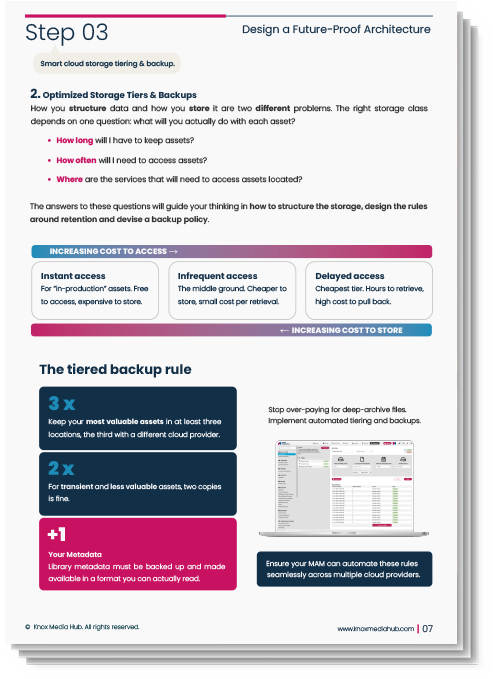
The questions above are the beginning, not the complete migration plan. Knox Media Hub has created a practical, free resource for media managers, operations leaders and content owners who need to audit, cleanse, migrate and maintain a complex media library.
The 5-Phase Playbook for Designing, Migrating & Maintaining Media Libraries includes the phased blueprint, decision prompts, checklists and practical guidance on metadata, storage tiers, backups, migration execution and ongoing reporting.
Need to discuss a specific library, legacy environment or migration model? Knox Media Hub can help assess the current estate, design the target structure and support a controlled transition without disrupting day-to-day media operations.
Want more Media Technology insights? Subscribe to our newsletter 📥