YouTube has become a television-scale destination. Media teams now need a publishing route that is as repeatable and well governed as the rest of their media supply chain.
YouTube is now a television scale destination
YouTube is no longer the second screen. It is the first one, and it has moved into the living room.
In the US, YouTube accounted for 12.9% of all TV viewing in October 2025, leading the rankings. (Nielsen)
In the UK, YouTube viewing on TV sets more than doubled, from 9 minutes per person per day in 2022 to 19 minutes in 2025. (Ofcom, Media Nations 2026)
Across Europe, YouTube is the top video service and often the single largest attention-getter in each market. (DPP, European Media Trends 2026)
Average daily YouTube usage per account rose to 99.1 minutes in 2025. (Digital i)
For Gen Z and Gen Alpha, YouTube is both the main TV screen and the default search engine.
If YouTube feels like the competitor eating your audience share, you are not wrong. But it is also the biggest window many media businesses are not using to its full potential. Sports highlights, catalogue titles, brand content, younger audiences, a monetised channel: whatever your business, getting content onto YouTube fast is a differentiator.
Doing it without a new tech stack, extra tools, a dedicated team or yet another silo is where the real savings are. For many teams, YouTube still sits outside the workflow: files get exported, re-uploaded and re-tagged by hand.
Why YouTube publishing becomes an operations matter
Average daily YouTube usage per account rose to 99.1 minutes in 2025. (Digital i)
The operational conclusion is simple: if YouTube is an important publishing window, feeding it cannot remain an improvised side task. The process needs the same attention to versions, rights, metadata, quality and accountability as any other distribution route.
Uploading a finished file is easy. Producing the right finished file, with the right information and the right approvals, is where the work accumulates. A typical publishing request can involve finding the master, cutting a shorter version, transcoding it, generating or translating subtitles, selecting a thumbnail, adapting metadata, confirming the destination channel and applying visibility or audience settings.
When those steps live across editing software, shared drives, spreadsheets, messaging threads and a separate publishing tool, the operation becomes a bottleneck. That may be manageable for one upload. It becomes fragile when teams publish regularly, operate several channels or need to repurpose large libraries.
Three ways to make more efficient video preparation & YouTube publishing with Knox Media Hub
1. Orchestrate every stage, all the way to YouTube
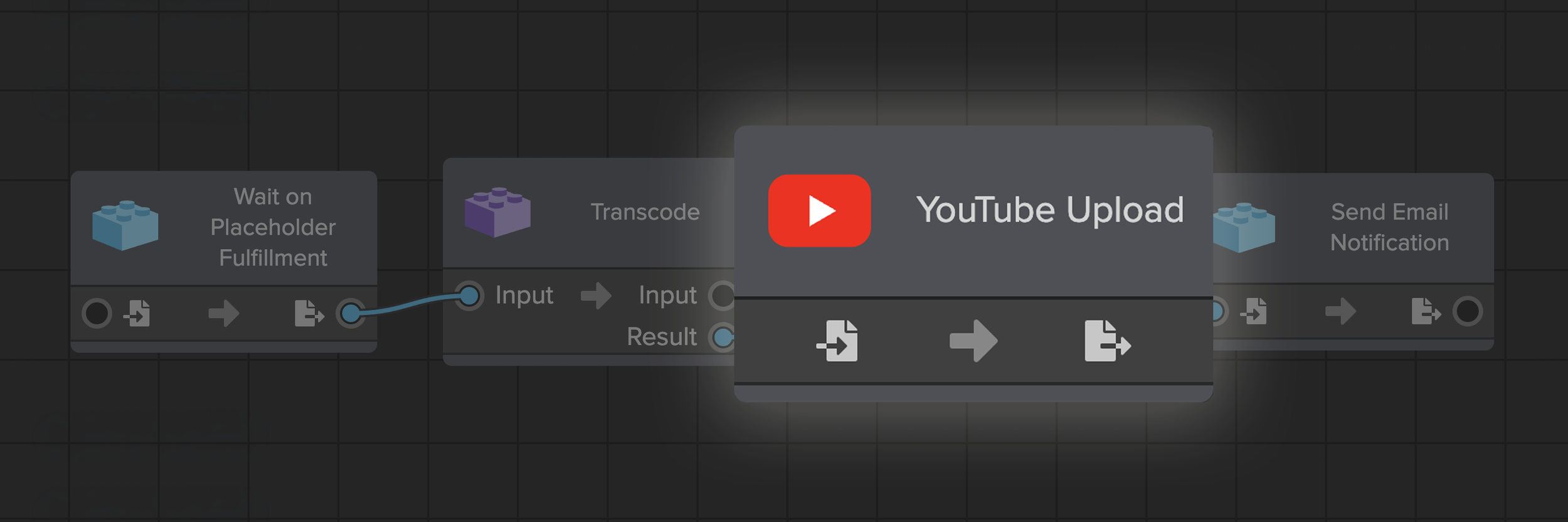
The YouTube Upload module inside a configured Knox Pipeline
Knox Pipelines is the no-code orchestration layer in Knox Media Hub. Teams build workflows visually by connecting modules, conditions, branches and triggers. A YouTube route can be launched manually, scheduled or started automatically when a defined condition is met.
Before publication, a Pipeline can coordinate operations such as transcoding, thumbnail retrieval, subtitle generation or translation, metadata updates, notifications and approvals. The exact sequence depends on the team's requirements; the point is that YouTube publishing becomes another configurable destination step, not a separate operation.
2. Prepare the video and everything that comes with it
Knox Lab is where the master becomes a YouTube-ready video. Clip it, prepare subtitles, add metadata and comment with your team, all from the browser.
The workflow starts with the media asset already held in the Knox Library. In Knox Video Lab, a user can create a clip from the master and work with the information that gives the video context, including time-based segments, metadata and subtitles. Review and collaboration can remain connected to the asset instead of producing another disconnected file and another trail of messages.
This is especially useful for highlights, interviews, archive clips, promotional extracts and other cases where the YouTube version is derived from a longer master. The source, the new version and the related data remain part of the same media operation.
3. Publish from one single source of truth
Teams can authorize one or more YouTube channels through Google sign-in. No separate API setup or third-party publishing tool is required. The publishing module can use information already held in Knox Media Hub to populate the delivery, including mapping MAM metadata to YouTube tags and selecting a thumbnail from the library.
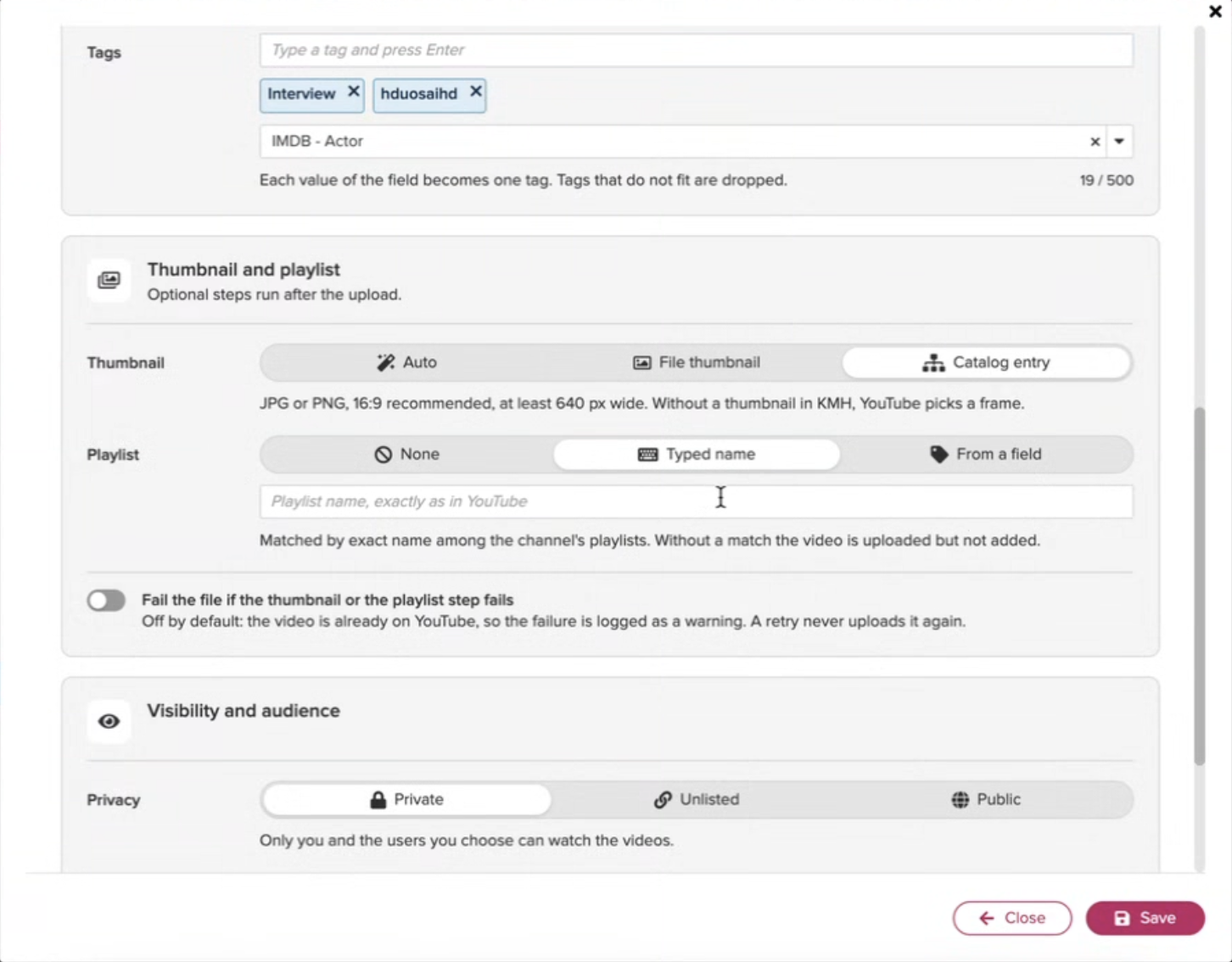
The team can also apply the appropriate publishing configuration, such as the target playlist, privacy and audience settings. Keeping those choices in the workflow reduces rekeying and gives operations teams a clearer view of what was sent, where and under which rules.
Connect your channels in a click. Authorise one or more YouTube channels through Google sign-in. No API setup, no third-party publishing tools.
Reuse your metadata. Map your MAM metadata to YouTube tags and fields instead of retyping it.
Pick thumbnails from the library. Prepare and publish thumbnails straight from your media assets.
Apply your settings. The publishing settings your team chooses are applied on upload.
Get the link back. Once the video is live, the workflow returns its YouTube URL.
From master to YouTube link: a practical example
Imagine a broadcaster, sports organization or content owner has a long-form master and wants to publish a short highlight to one of several YouTube channels. A connected route could work as follows:
1. Select the master. The operator starts from the approved asset in the Knox Library, with its existing metadata and related files.
2. Create the YouTube version. In Knox Video Lab, the team creates the clip and reviews the relevant segments, metadata and subtitles.
3. Launch the appropriate Pipeline. A manual action, schedule, placeholder fulfillment or metadata condition can trigger the workflow, depending on how the operation is configured.
4. Prepare the deliverable. The Pipeline can transcode the clip, retrieve or prepare a thumbnail, generate or translate subtitles, update metadata and route the asset through an approval step.
5. Publish to the selected channel. The YouTube module applies the configured tags, thumbnail, playlist, privacy, audience and other available settings.
6. Receive the live link. The workflow returns the published video's URL so the team can verify and reuse the result.
This is an example, not a mandatory template. Some teams will keep editorial approval before upload. Others may automate high-volume, rules-based publishing. The trigger, sequence, settings and degree of human involvement should reflect the content, rights and risk profile of the operation.
Frequently asked questions
Can Knox Media Hub publish directly to YouTube?
Yes. Knox Media Hub includes a direct YouTube publishing module that can be added to a configured Knox Pipeline.
Do teams need to configure the YouTube API separately?
No separate API setup is required for the publishing workflow. Teams authorize their YouTube channels through Google sign-in in Knox Media Hub.
Can an organization connect more than one YouTube channel?
Yes. Teams can authorize one or more channels and configure workflows around the appropriate destination.
Can MAM metadata be used for YouTube publishing?
Yes. Knox Media Hub can map metadata held in the media asset management environment to YouTube tags and use assets such as thumbnails from the library.
Can the workflow include subtitles and transcoding?
Yes. A configured Pipeline can combine YouTube publishing with media preparation steps such as transcoding, subtitle generation or translation, thumbnail retrieval, metadata updates and approvals.
Can YouTube publishing run without an operator?
It can, depending on the workflow configuration. Teams can use automatic triggers and rules, or retain manual and human-in-the-loop approval steps where needed.
What happens after the video is uploaded?
The workflow can return the published YouTube URL, giving the team a direct link to the live asset.
Feed your YouTube channels through workflows you already run.
The attention economy keeps moving to YouTube. Following it should not mean a new stack, a new team or a new silo. With direct YouTube publishing in Knox Media Hub, your channels are fed by the same media, metadata and workflows you already manage, from archive to a live, monetisable video.
Don't fear the algorithm. Feed it.